The Uncanny Valley of Upscaling: Why Nvidia's DLSS 5 is Redrawing the Boundaries of Game Art: A Comprehensive Guide
Introduction
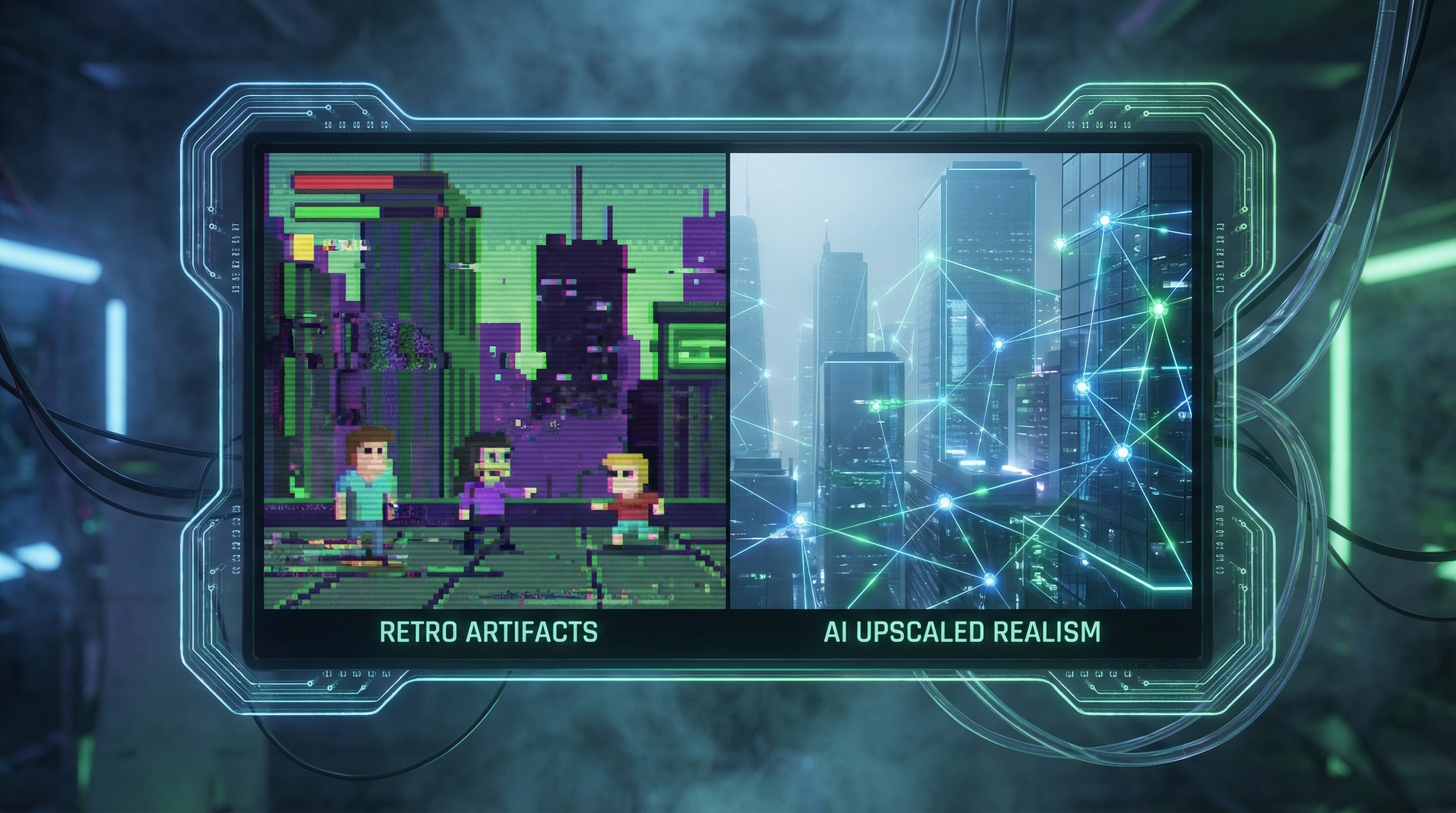
The pursuit of photorealism in real-time rendering has always been a battle of mathematical compromises. As monitor resolutions climb to 4K and beyond, and as refresh rates push past 144Hz, natively rendering complex, ray-traced game environments has become physically impossible for modern silicon. To bridge this compute gap, the industry turned to artificial intelligence. However, this transition introduced a phenomenon that technical artists and engineers dread: the uncanny valley of upscaling.
While AI upscaling frameworks have revolutionized frame rates, they have historically struggled with temporal stability, creating artifacts that look almost right, but inherently wrong to the human eye. Shimmering fences, ghosting behind fast-moving objects, and plasticky textures have plagued early iterations of upscaling technologies. This is where Nvidia's DLSS 5 (Deep Learning Super Sampling 5) enters the equation, fundamentally redrawing the boundaries of game art by relying on advanced neural foundation models to eliminate these perceptual errors.
In this comprehensive guide, we will explore the underlying causes of the uncanny valley of upscaling, analyze how DLSS 5 mitigates these issues through full neural rendering and ray reconstruction, and demonstrate how modern development pipelines can integrate these cutting-edge techniques. Because modern game tooling, cloud gaming infrastructures, and WebGPU bridges increasingly rely on modern web technologies, we will also provide practical, runnable TypeScript examples for configuring and managing DLSS 5 telemetry and rendering pipelines via SDK wrappers.
Whether you are a technical director optimizing a custom engine, a technical artist troubleshooting temporal artifacts, or a graphics engineer building the next generation of cloud-native games, understanding how to navigate and conquer the uncanny valley of upscaling is no longer optional—it is a mandatory skill in modern game development.
What is The Uncanny Valley of Upscaling?
The term "uncanny valley" traditionally refers to the unsettling feeling humans experience when interacting with humanoid robots or 3D characters that look almost, but not entirely, human. In the realm of real-time computer graphics, we have entered a new iteration of this phenomenon: the uncanny valley of upscaling.
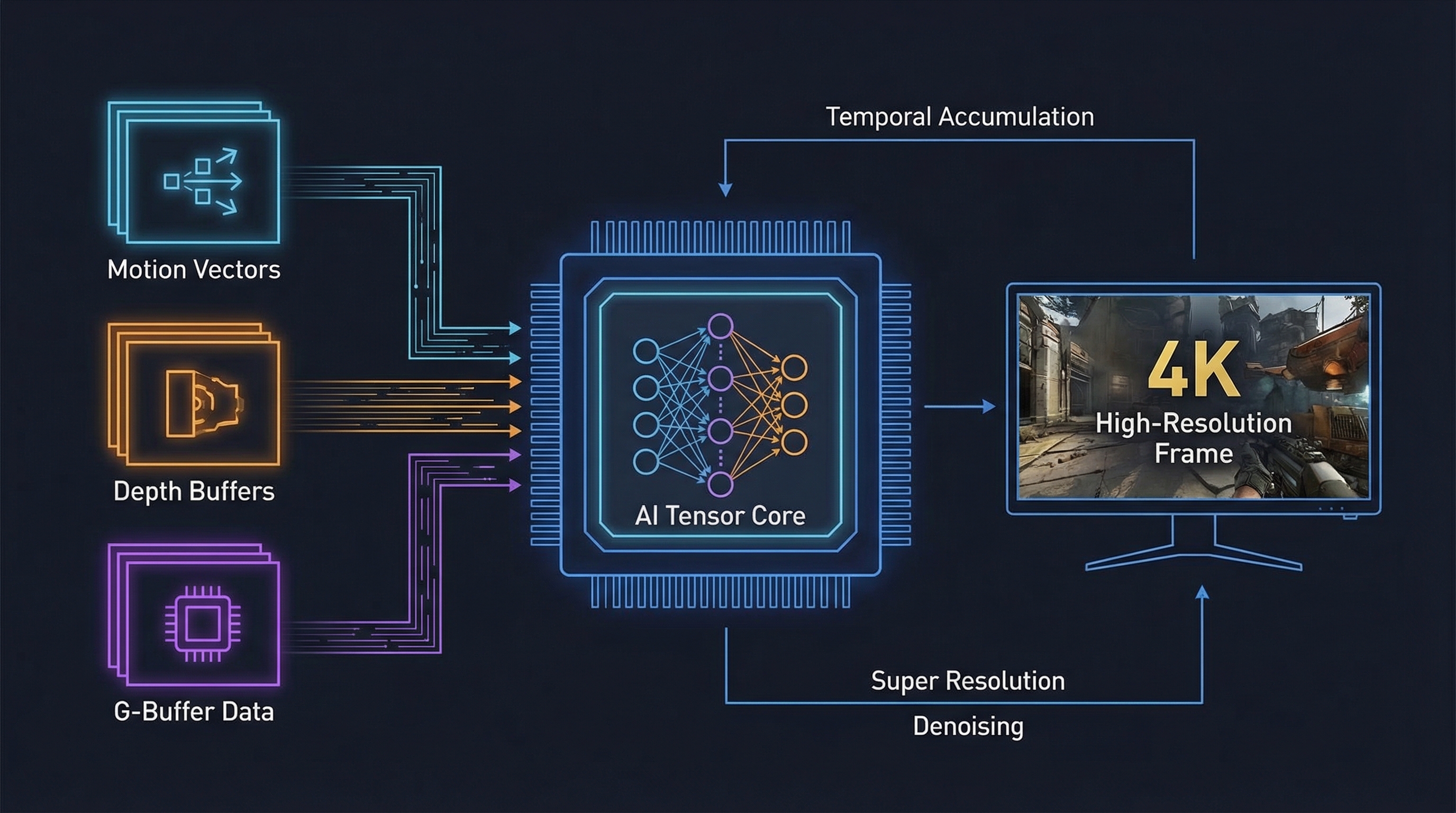
When developers rely heavily on temporal upscaling techniques or earlier iterations of AI-driven super resolution, the neural networks attempt to guess missing pixel data based on previous frames and motion vectors. When it works, the result is crisp, high-resolution imagery generated at a fraction of the compute cost. When it fails, the AI hallucinates.
These hallucinations manifest as distinct, unnatural artifacts. Fine geometric details, such as chain-link fences, power lines, or character hair, often dissolve into a fizzy, shimmering mess. Fast-moving objects leave behind a "ghosting" trail—a smear of incorrectly predicted pixels. Textures meant to look gritty and realistic can suddenly appear overly smoothed, looking like melted plastic. The human brain, highly evolved to detect visual anomalies in motion, immediately flags these artifacts as "wrong," completely shattering the immersion of the game art.
For technical artists and engine developers, the uncanny valley of upscaling poses a severe problem. You can spend thousands of hours crafting meticulous high-resolution textures, perfectly balancing physically based rendering (PBR) materials, and designing intricate lighting systems, only to have the upscaler scramble the data right before it hits the monitor. Artists find themselves compromising their vision, avoiding certain types of geometry or lighting setups simply because they know the AI upscaler will fail to reconstruct them accurately.
Nvidia's DLSS 5 aims to solve this by moving away from simple heuristic-based temporal accumulation and relying on massive, generalized neural foundation models. By understanding the context of the scene—recognizing that a cluster of pixels represents a shadow, or a reflection, or a specific material—DLSS 5 dramatically reduces the unnatural hallucination effect, pulling real-time game art out of the uncanny valley and into true high-fidelity rendering.
Key Features and Capabilities
Nvidia's DLSS 5 introduces a paradigm shift in how frames are reconstructed. By leveraging the latest Tensor Core architectures, DLSS 5 moves beyond simple spatial and temporal upscaling, integrating deep learning directly into the core rendering pipeline. Let's break down the key features that allow DLSS 5 to redraw the boundaries of game art.
Full Neural Ray Reconstruction
Traditional ray tracing relies on hand-tuned denoisers to clean up the inherently noisy output of sparse ray casting. These denoisers often strip away fine detail, resulting in muddy reflections and lost shadow data. DLSS 5 completely replaces multiple hand-tuned denoisers with a single, unified AI network trained on offline, path-traced images. This neural ray reconstruction identifies patterns in the noise, intelligently preserving high-frequency details like the texture of a brick wall reflected in a puddle, eliminating the smudged look associated with older upscaling methods.
Sub-Pixel Temporal Stability
One of the most jarring aspects of the uncanny valley of upscaling is temporal instability—pixels dancing or flickering when the camera is static or moving slowly. DLSS 5 features a radically upgraded temporal feedback loop. By utilizing higher-precision motion vectors and deeper historical buffers, the neural network maintains temporal coherence at a sub-pixel level. This ensures that thin geometry, such as grass blades and wire meshes, remain solid and stable across multiple frames, preserving the integrity of the original game art.
Generative Frame Interpolation
Building upon the frame generation introduced in DLSS 3, DLSS 5 introduces generative frame interpolation that better understands non-linear motion. Earlier frame generation could struggle with UI elements or sudden, erratic character movements, causing localized warping. The new optical flow accelerator, combined with an AI model trained on complex physical interactions, correctly masks out UI elements and predicts complex physics, delivering a buttery-smooth frame rate without the hallucinatory warping artifacts.
Dynamic Resolution Analytics Pipeline
For engineers, DLSS 5 provides a robust telemetry and analytics pipeline. It dynamically adjusts the internal rendering resolution based on frame-time targets and GPU load, while ensuring the final output remains visually consistent. This allows developers to hook into the DLSS SDK to monitor confidence metrics from the neural network, triggering fallbacks or adjusting game engine LODs (Level of Detail) in real-time if the AI struggles to reconstruct a particularly chaotic scene.
Installation and Setup
While DLSS 5 fundamentally operates at the C++ and driver level via DirectX 12 or Vulkan, modern game tooling, cloud streaming orchestration, and WebGPU-based editors increasingly utilize TypeScript for pipeline management and engine interfaces. To demonstrate practical integration, we will construct a TypeScript wrapper that interfaces with a DLSS 5 Native SDK via a Foreign Function Interface (FFI) in a Node.js/Electron environment, representing a typical modern game launcher or custom engine toolset.
To begin, ensure you have a modern Node.js environment installed (v18+). We will initialize a new project and install the necessary dependencies for our TypeScript integration. You will need a library like koffi or ffi-napi to bind to the compiled DLSS .dll or .so files.
// Initialize the project
npm init -y
npm install koffi typescript @types/node ts-node
npx tsc --init
Next, you must configure your tsconfig.json to ensure proper compilation for native bindings and strict typing, which is crucial when dealing with memory structures required by graphics APIs.
{
  "compilerOptions": {
    "target": "ES2022",
    "module": "CommonJS",
    "outDir": "./dist",
    "rootDir": "./src",
    "strict": true,
    "esModuleInterop": true,
    "skipLibCheck": true,
    "forceConsistentCasingInFileNames": true
  }
}
Before executing the code, you must ensure that the Nvidia DLSS 5 SDK binaries (nvngx_dlss.dll or platform equivalent) are located in your project root or system path. These binaries are typically obtained via the Nvidia Developer portal.
When working with FFI to bridge TypeScript and native C++ graphics libraries, memory alignment and pointer management are critical. Misaligned data structures will instantly crash the rendering pipeline. The setup requires defining exact representations of the C-structs expected by the DLSS 5 API.
Practical Examples
To effectively navigate the uncanny valley of upscaling, developers must meticulously configure the inputs fed into the DLSS 5 algorithm. In this section, we will provide complete, runnable TypeScript examples demonstrating how to wrap and control the DLSS 5 engine configuration.
Example 1: Initializing the DLSS 5 Wrapper
First, we create the TypeScript interface and FFI bindings for the DLSS initialization parameters. This code defines the required memory structures and establishes the connection to the native library.
import koffi from 'koffi';
import path from 'path';

// Load the native DLSS library
const dlssLibPath = path.join(__dirname, '../bin/nvngx_dlss.dll');
const dlssLib = koffi.load(dlssLibPath);

// Define C-Structs for DLSS Configuration
const NVSDK_State = koffi.struct('NVSDK_State', {
    resolutionX: 'uint32',
    resolutionY: 'uint32',
    targetFramerate: 'uint32',
    enableRayReconstruction: 'bool',
    qualityMode: 'int32' // 0: Ultra Performance, 1: Performance, 2: Balanced, 3: Quality
});

// Define the initialization function signature
const initDLSS = dlssLib.func('InitializeDLSS5', 'int32', [koffi.pointer(NVSDK_State)]);

export class DLSS5Manager {
    private state: any;

    constructor(resX: number, resY: number, mode: number) {
        this.state = {
            resolutionX: resX,
            resolutionY: resY,
            targetFramerate: 120,
            enableRayReconstruction: true,
            qualityMode: mode
        };
    }

    public initialize(): boolean {
        console.log('Initializing Nvidia DLSS 5 Pipeline...');
        const result = initDLSS(this.state);

        if (result !== 0) {
            console.error(`DLSS 5 Initialization failed with code: ${result}`);
            return false;
        }
        console.log('DLSS 5 Pipeline initialized successfully. Ray Reconstruction Active.');
        return true;
    }
}

// Usage:
// const manager = new DLSS5Manager(3840, 2160, 3);
// manager.initialize();
Example 2: Binding Motion Vectors and Depth Buffers
To prevent upscaling artifacts, the neural network requires accurate motion vectors and depth buffers. If these are improperly formatted, the AI will hallucinate. Here is how you might update the frame data bindings every tick in a custom engine architecture.
// Define the Frame Data struct expected by DLSS
const FrameData = koffi.struct('FrameData', {
    colorBufferPtr: 'void*',
    depthBufferPtr: 'void*',
    motionVectorPtr: 'void*',
    jitterOffsetX: 'float',
    jitterOffsetY: 'float',
    resetHistory: 'bool'
});

const evaluateFrame = dlssLib.func('EvaluateDLSSFrame', 'int32', [koffi.pointer(FrameData)]);

export interface RenderBuffers {
    color: ArrayBuffer;
    depth: ArrayBuffer;
    motion: ArrayBuffer;
}

export function processFrame(buffers: RenderBuffers, jitter: {x: number, y: number}, isSceneCut: boolean): void {
    // In a real scenario, these pointers come from WebGL/WebGPU texture handles
    // mapped to native memory space.
    const frameConfig = {
        colorBufferPtr: koffi.address(buffers.color),
        depthBufferPtr: koffi.address(buffers.depth),
        motionVectorPtr: koffi.address(buffers.motion),
        jitterOffsetX: jitter.x,
        jitterOffsetY: jitter.y,
        resetHistory: isSceneCut // CRITICAL: Reset history on scene cuts to prevent massive ghosting
    };

    const status = evaluateFrame(frameConfig);
    if (status !== 0) {
        console.warn('DLSS Frame Evaluation skipped or dropped.');
    }
}
Example 3: Managing UI Masks for Frame Generation
One of the biggest contributors to the uncanny valley of upscaling is when AI attempts to interpolate stationary UI elements during camera panning, causing text to smear. DLSS 5 allows developers to pass a UI mask to exclude regions from frame generation.
const UIMaskData = koffi.struct('UIMaskData', {
    maskTexturePtr: 'void*',
    enableMasking: 'bool',
    maskThreshold: 'float'
});

const setUIMask = dlssLib.func('SetDLSSUIMask', 'void', [koffi.pointer(UIMaskData)]);

export class HUDManager {
    private maskBuffer: ArrayBuffer;

    constructor(bufferSize: number) {
        this.maskBuffer = new ArrayBuffer(bufferSize);
    }

    public updateMask(activeUIElements: any[]): void {
        // Logic to write 1.0 (exclude) or 0.0 (include) to the mask buffer based on UI
        this.renderUIToBuffer(activeUIElements);

        const maskConfig = {
            maskTexturePtr: koffi.address(this.maskBuffer),
            enableMasking: true,
            maskThreshold: 0.5
        };

        setUIMask(maskConfig);
        console.log('UI Mask updated for generative frame interpolation.');
    }

    private renderUIToBuffer(elements: any[]) {
        // Mock implementation of UI rendering to the alpha mask
    }
}
Example 4: Telemetry and Dynamic Resolution Scaling (DRS)
To ensure optimal performance, we can build a TypeScript event listener that polls DLSS 5 telemetry data to adjust the base engine rendering resolution dynamically, maintaining a locked frame rate.
const DLSSTelemetry = koffi.struct('DLSSTelemetry', {
    renderTimeMs: 'float',
    upscaleTimeMs: 'float',
    aiConfidenceScore: 'float',
    vramUsageMB: 'uint32'
});

const getTelemetry = dlssLib.func('GetDLSSTelemetry', 'void', [koffi.out(koffi.pointer(DLSSTelemetry))]);

export class ResolutionScaler {
    private currentScale: number = 1.0;
    private readonly MIN_SCALE = 0.5;
    private readonly MAX_SCALE = 1.0;

    public monitorAndAdjust(targetFrameTime: number): void {
        const telemetryData: any = {};
        getTelemetry(telemetryData);

        // If AI confidence is low, the image looks "uncanny". We should increase base resolution.
        if (telemetryData.aiConfidenceScore < 0.85) {
            console.log('AI Confidence low. Increasing base resolution to feed more data to DLSS.');
            this.adjustScale(0.05);
        }

        // If render time exceeds our target, decrease base resolution to save time.
        const totalTime = telemetryData.renderTimeMs + telemetryData.upscaleTimeMs;
        if (totalTime > targetFrameTime) {
             this.adjustScale(-0.02);
        } else if (totalTime < targetFrameTime * 0.8) {
             this.adjustScale(0.02);
        }
    }

    private adjustScale(delta: number) {
        this.currentScale = Math.min(this.MAX_SCALE, Math.max(this.MIN_SCALE, this.currentScale + delta));
        // Trigger engine resolution change here
    }
}
Advanced Use Cases
Mastering the basics of DLSS 5 integration is only the beginning. To truly conquer the uncanny valley of upscaling, technical artists and engine developers must delve into advanced use cases and edge-case optimizations that push the boundaries of game art.
Non-Real-Time Asset Generation
While DLSS 5 is designed for real-time rendering, progressive studios are utilizing the DLSS 5 API in offline rendering pipelines within engines like Unreal Engine and custom TypeScript-based cloud pipelines. By feeding heavily oversampled, path-traced frames into the DLSS 5 neural network at a slow pace, studios can generate ultra-high-resolution skyboxes, impostor sprites, and cinematic assets. This leverages the AI's hallucination mitigation to produce pristine assets that are entirely free of temporal noise, baking photorealism directly into the game's static assets.
Handling Extreme Motion Vectors
One of the most difficult edge cases involves teleportation or extreme, sudden camera cuts. If motion vectors are mathematically valid but practically represent a complete scene change, the AI will attempt to blend two entirely different physical spaces, resulting in extreme visual corruption. Advanced integrations must include strict logic—as hinted at in our TypeScript examples—to manually flush the temporal history buffers (resetHistory = true) the exact microsecond a camera cut is detected. Failing to do so forces the player straight back into the uncanny valley.
VRAM Management and Neural Network Swapping
DLSS 5's massive foundation models consume significantly more VRAM than previous iterations. In a memory-constrained environment, developers must balance texture pools, geometry, and the DLSS overhead. Advanced implementations utilize dynamic memory offloading, monitoring the telemetry API to dynamically lower texture mipmap biases when the DLSS tensor footprint expands during heavy ray reconstruction scenes. This prevents out-of-memory crashes while maintaining visual fidelity.
Comparison and Ecosystem Context
Nvidia's DLSS 5 does not exist in a vacuum. It operates within a fiercely competitive ecosystem of upscaling technologies, primarily contending with AMD's FidelityFX Super Resolution (FSR) and Intel's XeSS. Understanding how it compares is crucial for technical directors designing multi-platform game pipelines.
Unlike traditional spatial upscalers (like early FSR 1.0 or simple Lanczos filtering) which rely purely on neighboring pixels to guess high-resolution output, DLSS 5 is fundamentally a neural temporal upscaler. While AMD's FSR 3 and 4 have incorporated advanced temporal algorithms and frame generation, they historically execute on standard compute shaders rather than dedicated AI hardware. This makes FSR hardware-agnostic, which is a massive win for cross-platform compatibility, but it often lacks the intricate ray reconstruction capabilities that DLSS 5 provides via Nvidia's proprietary Tensor Cores.
When designing a game engine architecture, the best practice is to abstract the upscaling logic. Using TypeScript or C++ abstraction layers, engines should be built to detect the host hardware and route the rendering pipeline accordingly. If an RTX GPU is detected, the engine should hook into the DLSS 5 SDK to leverage hardware-accelerated ray reconstruction. If an AMD or older GPU is detected, it should seamlessly fall back to FSR or XeSS. This ensures that the boundaries of game art are pushed to the absolute maximum on supported hardware, without isolating players on alternative platforms.
Conclusion
The uncanny valley of upscaling has been a persistent thorn in the side of game developers, forcing compromises between performance and visual integrity. Nvidia's DLSS 5 represents a monumental leap forward in solving this problem. By replacing hand-tuned heuristics with massive neural foundation models, and by introducing complete neural ray reconstruction, DLSS 5 successfully translates noisy, low-resolution data into stunning, temporally stable game art.
As we have demonstrated through our TypeScript implementation examples, integrating this technology requires more than simply flipping a switch in an engine editor. It demands precise management of motion vectors, depth buffers, UI masking, and dynamic resolution telemetry. Developers who master these integrations will not only optimize their frame rates but will fundamentally protect the artistic vision of their games from digital hallucinations and artifacting.
Your next step as a technical artist or engine programmer is to dive into the DLSS SDK documentation, audit your current rendering pipeline's motion vector accuracy, and begin prototyping dynamic upscaling telemetry. By embracing AI-driven neural rendering, you can finally bridge the gap between performance constraints and photorealism, leaving the uncanny valley of upscaling behind for good.